Git best practices to avoid 'burnout'
How to prevent burnout and stay motivated in the tech world with these git best practices

introduction:
Git is a free, distributed version control system used to track changes to source code during software development. It was created by Linus Torvalds in 2005 for the development of the Linux kernel.
Burnout syndrome is a state of physical, emotional or mental exhaustion that is produced by work stress and that can have consequences on self-esteem. The syndrome is characterized by a gradual process, by which people lose interest in their tasks and their sense of responsibility.
As for Git, although it is not a tool that directly causes burnout syndrome, it can contribute to it if good practices are not used, since they prevent volatility in your projects.
The volatility of using Git is because any change made to the repository can affect the entire team. Therefore, it is important to adopt good practices when using Git to avoid problems and conflicts.
The following information is intended for people familiar with the version control system: git. For more comfort when reading this blog you should know "branches", "commits" and "the gitignore file". However, each concept will be briefly explained below
Gitflow:
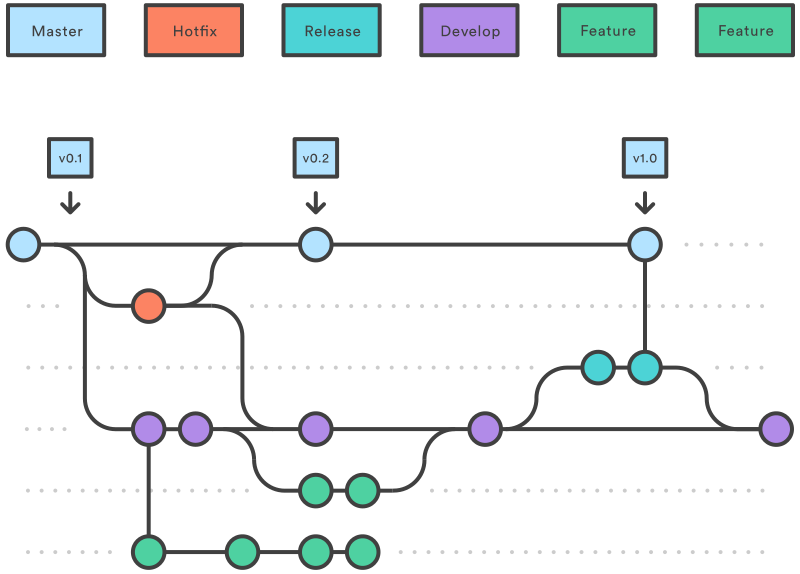
Gitflow is a popular methodology for managing branches in Git repositories, which has been adopted by many companies and development teams. Generally speaking, Gitflow can be a good option if your project has a long and complex lifecycle, with multiple developers working on different features at the same time.
For a better understanding of the diagram:
Each circle refers to a
commit, each circle has a color corresponding to the conventions at the top of the diagram, and finally, the rows refer to abranchof your repository:
These are the components of the diagram:
Master: The master branch contains the stable releases of our software. This is the branch that a typical user will download to use our software, so everything in this branch should be functional. However, the latest improvements to the software may not yet be available in this branch.
Develop: In this branch arises from the last release of
master. All new features are integrated into it until the next release.feature-X: Each new improvement or feature that we are going to introduce in our software will have a branch that contains its development.
Featurebranches are pushed out of thedevelopbranch and once the development of the enhancement is complete, they are integrated back intodevelop.release-X:
Releasebranches are created when the next version of the software is about to be released and arise from thedevelopbranch. In these branches, the development of new features is frozen, and work is done on fixing bugs and generating documentation. Once ready for release, it is integrated intomasterand tagged with the appropriate version number. They are also integrated withdevelop, since their content may have changed due to new improvements.hotfix-X: If our code contains critical bugs that need to be patched immediately, it is possible to create a
hotfixbranch from the corresponding release in the master branch. This branch will only contain the changes that need to be made to patch the bug. Once fixed, it will be integrated intomaster, with its corresponding version tag, and intodevelop.
Better commit messages:
Commit messages are useful because they allow developers and project collaborators to quickly understand the changes that have been made to the repository. Commit messages can also help developers remember why certain changes were made and when they were made. Remember the word why, the most important part of a commit message is not the changes made, it's the reason for the changes.
Use the imperative verb.
(Add, Change, Fix, Remove, …) to express the action that is performed in the commit. For example, git commit -m "Add new search feature"
Do not use a full stop (.) or ellipsis (...) in your messages.
The commit message is the commit title and does not need final punctuation. For example, git commit -m "Fix a problem with the topbar"
Use a maximum of 50 characters for your commit message.
Be short and to the point. If you have a lot to explain, it's probably because your commit does too much. For example, git commit -m "Change the default system color"
Add as much context as necessary in the body of the commit message.
Sometimes you need to provide more information about your commit. To do this, you can use a blank line after the message and write more detailed text. For example, git commit -m "Add a new search feature
This feature allows users to search by keywords and filters"
Use a prefix for your commits to make them more semantic.
You can use tags like [FEATURE], [BUGFIX], [REFACTOR], etc. to indicate the type of change you are making. For example, git commit -m "[FEATURE] Add new search feature"
Type a subject and a message.
The subject is the first line of the commit message and should summarize the purpose of the change. The message is the optional text that follows the subject and should explain the why and how of the change. For example, git commit -m "Fix a problem with the topbar
The topbar was not responsive and overlapped with other elements on small screens. This commit fixes the CSS rules to make it adapt to different screen sizes."
know about the management of the dependencies
Dependencies in a repository are external packages or libraries that your project's code needs to function correctly. These dependencies are specified in a configuration file and are automatically installed when you clone the repository or run a specific command.
It is recommended to know how to manipulate the dependencies in your repository to avoid the below problems:
Bad installation of dependencies can take up a lot of space and make your repository slower to clone or download.
Dependencies may have security vulnerabilities that affect your project or the users who use it.
Dependencies can change or become unavailable and break your project or make it incompatible with other versions.
What you should do with dependencies is declare them in a manifest or lock file that specifies the name, version, and source of each one.
A manifest file is a file that specifies a project's dependencies and their versions. On the other hand, a lock file is a file that specifies the exact versions of a project's dependencies. The lock file is used to ensure that everyone working on the project uses the same versions of the dependencies.
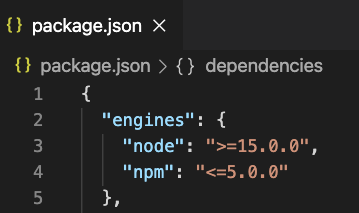
When you install dependencies with npm or pip, files are generated that contain information about the dependencies and their versions. These files are useful for making sure that everyone working on the project has the same versions of the dependencies installed. They are also useful for making sure that the project can be built successfully in different environments.
In the case of npm, two files are generated: package.json and package-lock.json. The package.json file contains information about the project and the dependencies needed to run it. The package-lock.json file contains detailed information about the dependencies and their exact versions.

In the case of pip, a file called requirements.txt is generated that contains a list of all dependencies and their exact versions. This file can be used to install all necessary dependencies in a new environment.
Last but not least, you must put in your .gitignore file the directory: node_modules
Use .gitignore
A .gitignore file is a text file that tells Git which files or folders to ignore in a project. Ignored files are typically build artifacts and team-generated files that may be derived from your source repositories or should not be committed for some other reason.
Here are some common examples:
Dependency caches, such as the content of /node_modules or /packages.
Compiled code, such as the .o, .pyc, and .class files.
Build output directories, such as /bin, /out, or /target.
Files generated at run time, such as .log, .lock, or .tmp. Hidden system files, such as .DS_Store or Thumbs.db.
Personal IDE configuration files, such as .idea/workspace.xml.
GitHub maintains an official list of recommended .gitignore files for many popular operating systems, environments, and programming languages in the public github/gitignore repository. You can also use gitignore.io to create a .gitignore file for the operating system, programming language, or IDE.
Conclusion:
As a conclusion, I leave you with a small summary of what I have seen in this blog.
Burnout syndrome is a state of physical, emotional and mental exhaustion caused by chronic stress at work. It can affect people's health, performance and motivation.
Gitflow is a Git branching model that uses feature branches and multiple parent branches to organize a project's development and releases. It was proposed by Vincent Driessen at nvie and is based on the feature branch workflow.
Good practices for commits in Git are those that make it easy to read, track, and collaborate on project history. Some of them are: using the imperative verb, not using final punctuation, limiting the title to 50 characters, adding context in the body, using semantic prefixes, and overriding ignored patterns.
Dependencies are the packages, libraries or modules that a project needs to function correctly. They are usually installed using package managers like npm or pip and are stored in configuration files like package.json or requirements.txt.
Using gitignore is a way of telling Git which files or folders to ignore in a project. These are typically build artifacts, generated files, system files, or personal files that should not be committed or shared. A .gitignore file is created in the root of the repository with the patterns to be excluded.
Gratefulness:
I hope you enjoyed this article and that you learned something new and interesting. Thank you very much for reading to the end and for dedicating your time to this blog. Now I encourage you to put the knowledge you have gained into practice and share it with others who can benefit from it.
Remember that learning is an ongoing process and that you can always keep expanding your horizons.
Make changes today for a better day tomorrow.
As a beginner on hasnode I would appreciate it if you would leave a comment in order to improve my future blogs. If you liked this article, feel free to leave a comment, give the blog a heart or follow me.
Until next time!